Welcome to our comprehensive guide on leveraging the power of our AutoCollect Module for enhanced financial management and customer relations.
In this guide, we will walk you through the key features, benefits, setup process, and everything you need to know to make the most out of this essential tool.
Important: As part of AutoCollect, you can send email reminders to your customers. We highly recommend adjusting the existing email templates by copy and pasting our recommended email templates from this article.
What is Virtuagym Pay AutoCollect?
As part of our suite of full-service payment solutions, you can now set customizable email reminders when following up with clients about overdue invoices and payments.
What are the benefits?
-
Increased procedural efficiency: The AutoCollect module automates the AutoCollect process (e.g. sending of emails at defined timelines, changing payment methods, charging administrative fees), which saves yours and your staff’s time and effort.
-
Improved customer relations: The AutoCollect module allows you to send personalized emails to your clients, which can help to improve customer relations and reduce unintentional churn.
-
Reduced debt: The AutoCollect module can help you to collect outstanding invoices more efficiently, which can help to reduce debt.
-
Recover potential additional transaction and/or chargeback costs: With the option to include administrative costs on the follow-up emails, you can easily recover the costs that you incurred on when a failed payment comes through. This way you’re able to, not only get that money back, but also to get some additional revenue from there.
How does it work?
Our AutoCollect solution works by automating the process for communicating with customers who are overdue on their invoices and payments via customizable email templates. If a payment fails, the automated AutoCollect process is triggered for that invoice. It requires no manual input unless you wish to invoice them yourself. Furthermore, once enabled, the module includes a filter that enables you to have a clear overview of which invoices are following a follow-up process and which stage of that process they are in.
With this tool, you can:
-
Send reminders at set intervals, escalating the urgency as the due date for the payment further passes
-
Organize overdue payments by status, based on predefined categories
-
Classify the severity of overdue payments based on predefined categories
-
Automatically add a collection fee at any point in the process (with your email reminders)
As such, you can improve your financial management, save valuable time chasing overdue payments and reduce your payment processing costs. Please note that if you are unable to collect a payment at the end of the follow up process, Virtuagym can provide you with all the necessary information related to the debt collection communication process.
How do I set it up?
As this feature only works with Virtuagym Pay, please first ensure you have Virtuagym Pay enabled with your desired payment methods eg. Direct Debit & Credit Card Online. Should you need help with this process, please refer to this guide.
Please follow these steps to enable Virtuagym Pay AutoCollect:
1. Head to "System Settings," → "Automate - Payments."
2. Choose your desired flow. Not sure which one to choose? Click here for more information
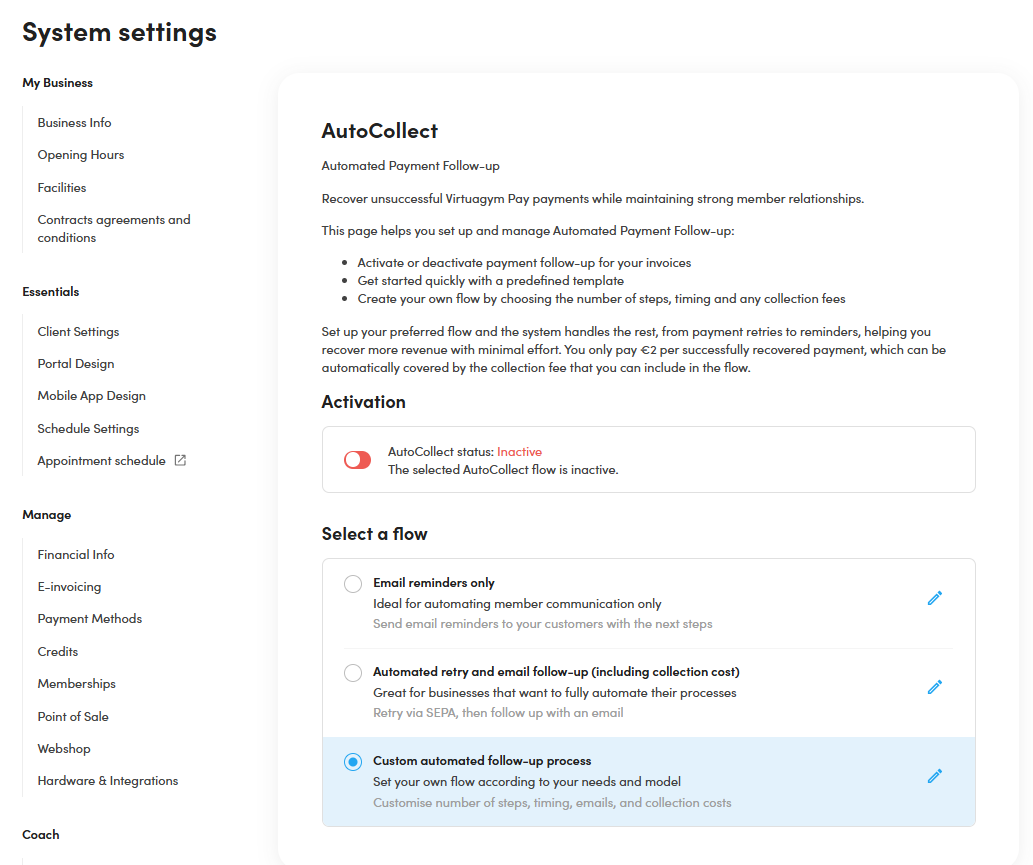
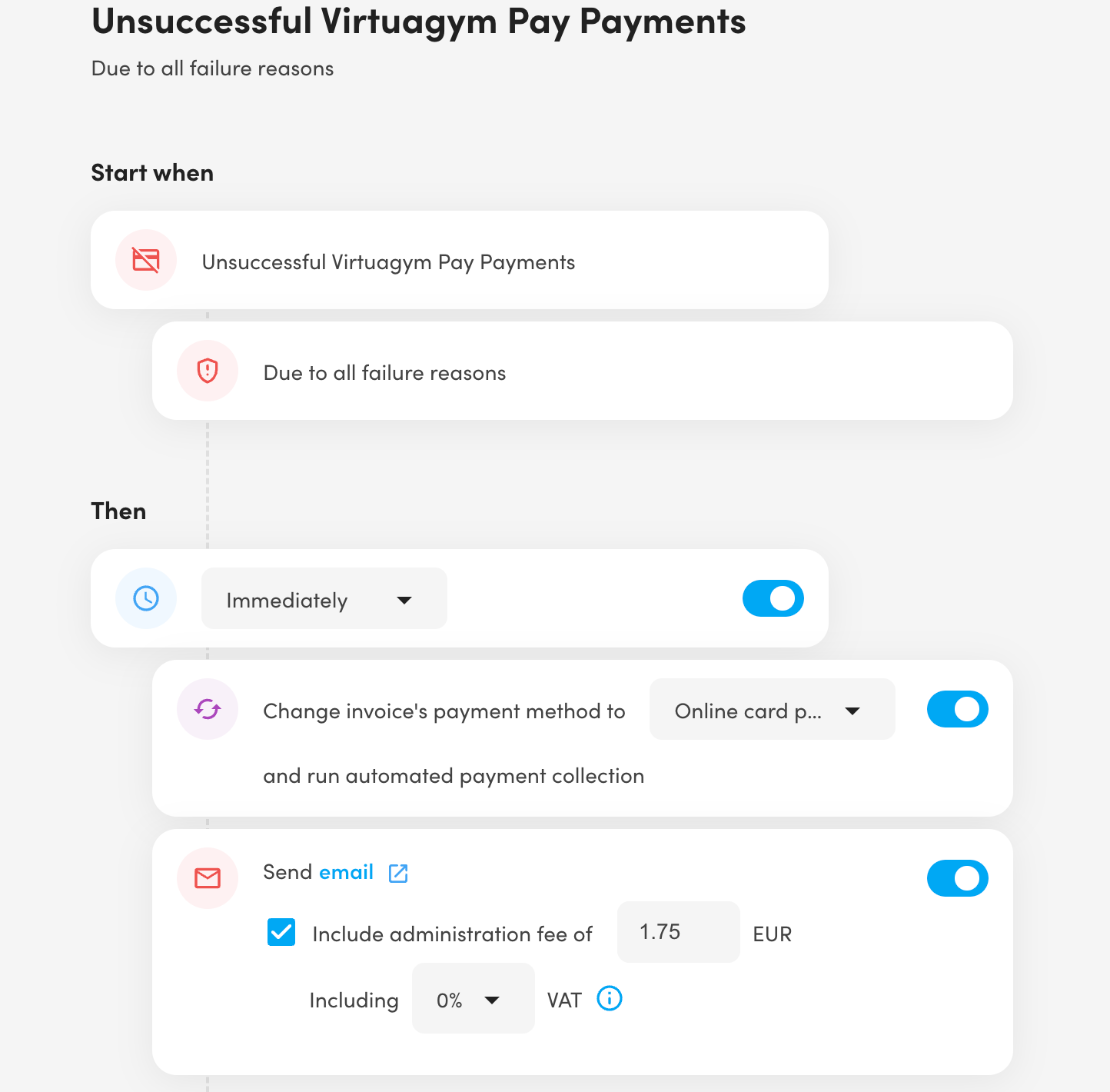
Please note: Initially, a default flow is provided, consisting of two emails sent immediately after payment failure and 18 days later, with suggested administration costs of 1.75 and 14.70, respectively (not cumulative).
Within this menu, you can customise the following parameters:
-
Number of reminder emails sent (up to 4)
-
Option to include administration costs in each reminder email
-
Ability to customise email templates by clicking on each email link (different template options available when administration costs are included)
-
Edit the timeline for sending reminder emails
-
Choose between automated or manual payment methods for failed invoices: automated retries without intervention, while manual requires members to pay via a provided link.
These settings offer flexibility in tailoring the AutoCollect Module to suit your specific needs and preferences, ensuring effective communication with customers regarding overdue payments.
3. Save automation settings to activate the AutoCollect flow.
AutoCollect in Action
Once everything is set up, the AutoCollect module will automatically activate when a payment fails with Virtuagym Pay. The predefined flow will be triggered for the relevant invoice, scheduling the actions based on your defined timeline.
You can monitor which phase an invoice is in using the newly created 'AutoCollect' filter in the Financial Overview.
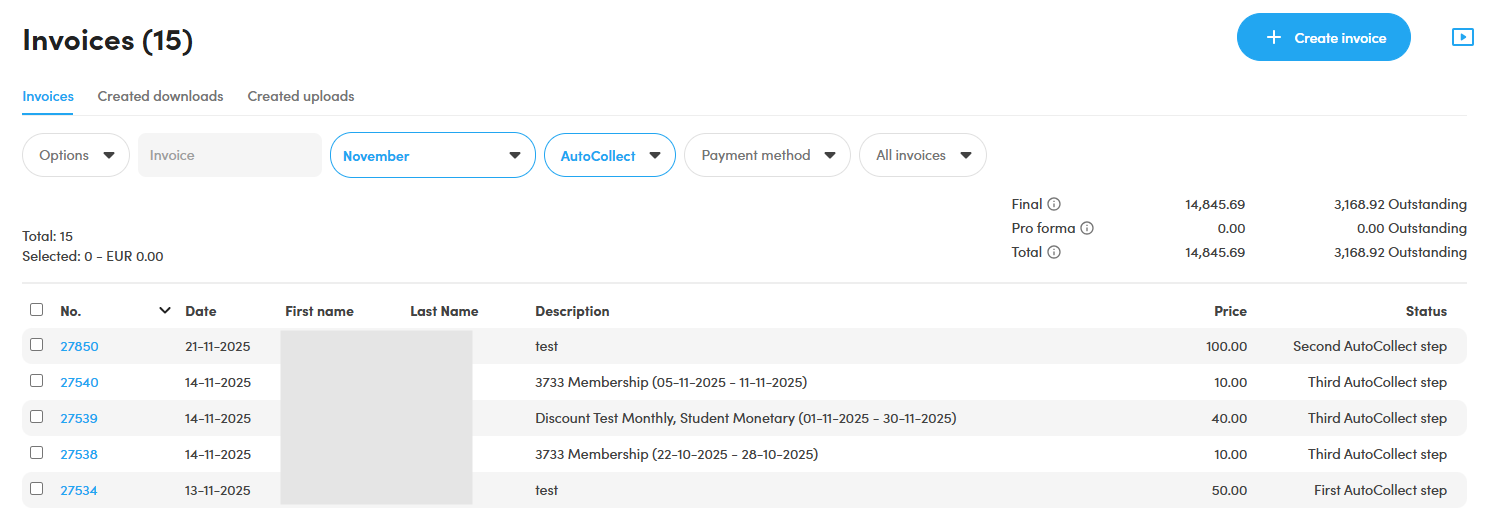
Our invoice export functionality has been upgraded to include details on every AutoCollect phase an invoice has gone through—such as when a reminder was sent, to which email address, the reason for the payment failure and any associated administration costs.


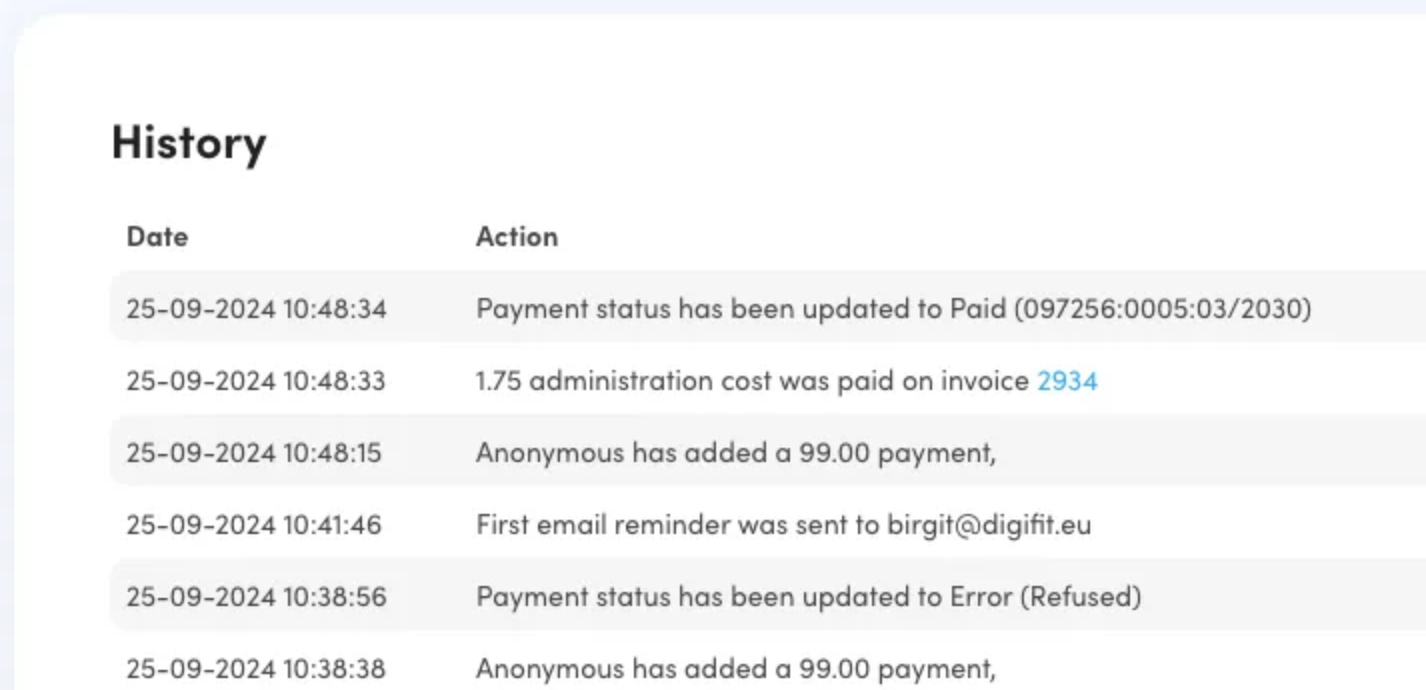
When you view an invoice that has gone through the follow-up process, all the details will be available in the invoice history table, including the reminder emails and collection fee that were included in the invoices. When an invoice that was on a follow-up process gets paid, it will be removed from the AutoCollect filter automatically.
AutoCollect Overview
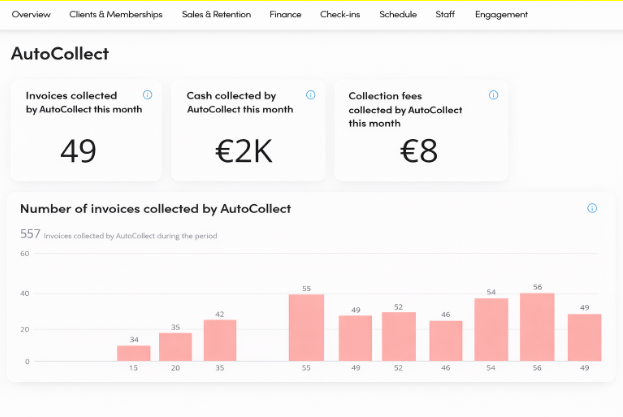
For a clear overview of all your AutoCollect invoices, you can go to the Business Analytics module in your Virtuagym portal. Navigate to the Finance tab and select AutoCollect. Here, you will find an overview of the number of invoices collected via AutoCollect, the collection fees generated, and more. For a more detailed explanation of this overview, please refer to this article.
AutoCollect FAQ
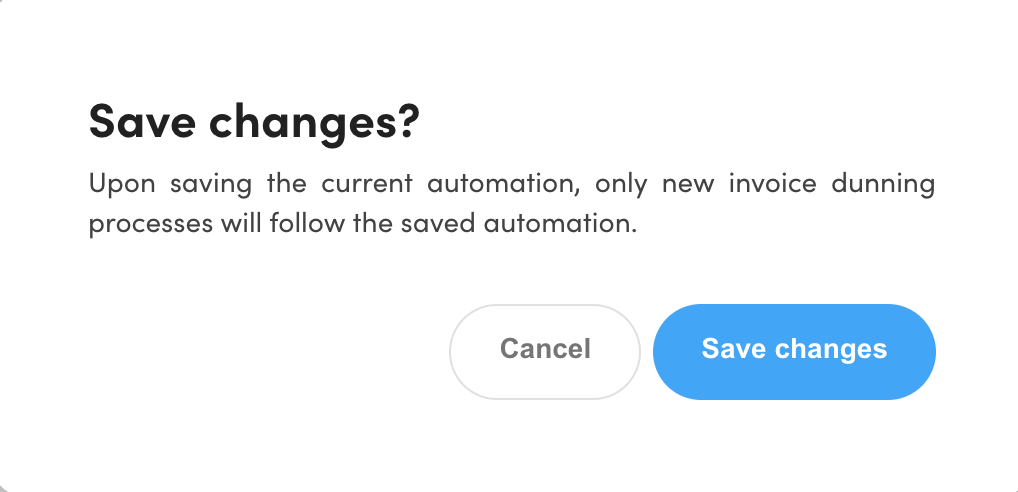
1. What happens if I turn off the AutoCollect flow completely? If the AutoCollect automation is turned off, then the currently ongoing follow-up processes will be completely deactivated. This means that the actions that were scheduled to happen (send email reminders, collect fees, etc.) for invoices that had failed payments will be cancelled. Once the automation is turned off, these processes aren’t recoverable, and if the automation is turned on again, only newly failed payments will create new follow-up processes. Each time the following image appears, this is the effect that it will cause.
2. What happens with the currently ongoing follow-up processes if I edit the AutoCollect flow to be triggered? If the currently defined AutoCollect flow to be triggered is edited (as done in step 3) and saved, then only the newly triggered failed payments will follow the steps now defined. The previously ongoing follow-up flow will still follow the actions that were defined before and that got triggered when their payments failed. Currently, there is no way to differentiate an invoice that has the old process and another one that follows the new one.
3. Is there any way to use the AutoCollect Module with any of the other payment providers that we currently use? No, the AutoCollect Module is part of our Virtuagym Pay & Mollie broader project and, for that reason, is only available with Virtuagym Pay or Mollie Payments.
4. What payment methods are available for the AutoCollect process? Credit/Debit Card Automated, Credit/Debit Card Manual, Direct debit (SEPA) and iDEAL (NL)
5. Is there any way to conclude an AutoCollect process other than proceeding with the payment link that is sent on the email reminder? Yes, an AutoCollect process is concluded as soon as an invoice is marked as paid in any way possible. It can be through the payment link that is sent automatically on the payment reminder, by manually marking the invoice as paid, by crediting an invoice or by sending a payment link with another payment method/provider that is part of Virtuagym Pay (or not, although it’s not the intended usage). Good to note that, except for the email reminder route, the creation of invoices with collection fee and payment links that happens in an automated and automatic fashion, all other options require manual actions to be performed by staff members.